At a glance
Resilio Sync connects your devices to each other and moves data straight between them. Foldpair sends encrypted data through an authenticated temporary relay that both devices talk to. That one design choice explains most of the rows below. Resilio facts come from Resilio's own pages, checked as dated in the sources list; Foldpair facts come from our own help pages.
| Question | Foldpair | Resilio Sync |
|---|---|---|
| Primary connection model | Synchronizes selected folders between participating devices through an authenticated temporary relay. The relay is not a cloud drive and has no storage plans or file browser. | Resilio's Security & Privacy Brief states Sync "establishes a direct connection between your devices (peers), allowing data to exist at rest exclusively on private infrastructure." |
| Devices on the same network (LAN) | Data still goes through the relay, so a same-room transfer is not a local-only copy. No head-to-head speed test has been run. | A direct connection avoids a relay hop, which is why Resilio is the natural pick for fast same-network copies. Actual speed depends on disks and network; Resilio's page gives no LAN figures. |
| Devices on different networks, CGNAT or VPN | Designed to work across different networks and compatible with an existing VPN. There is no router or port-forwarding step in the workflow. | Resilio's 2016 security brief states that when peers cannot connect directly, for example behind a symmetric NAT, its Relay Server is used, and that more than 97% of all data went directly between devices. |
| Other device is offline | Changes wait on the relay in encrypted form and are delivered when that device comes back, within the retention period. The buffer is 1.5 GB in flight on Free and 10 GB on Pro. | Resilio's brief states relay pieces "are never stored at rest", so the relay is not a holding area. A device that is off receives changes from other online devices once they are both reachable. |
| Encryption | Folder and clipboard contents are encrypted on the device with AES-256-GCM before relay transport, with TLS in addition. Keys stay on participating devices. | Resilio's brief states an SSL connection between peers with data "AES 128-bit encrypted before it leaves the device"; relay pieces are 128-bit AES and keys are held only by peers. |
| What the intermediary sees | The relay cannot open encrypted file contents, but it does see file names and sizes, and for clipboard items the type, source device and time. | Resilio's brief says tracker servers help peers find each other's IP addresses and receive the folder ID, IP addresses and port; this can be turned off. |
| Large files | When an earlier version is known, the desktop app can upload a FastRsync binary delta instead of the whole file. | Check Resilio's current documentation for its own delta behaviour; this page does not compare large-file transfer speed. |
| Clipboard | Clipboard sync for text and images between your own devices on every plan, switched per device. | Not listed among the Sync features on Resilio's product page. |
| Platforms | Windows, macOS, Linux (x64 and arm64) and an Android app for one-off file transfers. No iOS release yet. | Windows 7 or later (64-bit), macOS 10.13 or later, Linux x64 and ARM64, mobile apps in the Apple App Store and Google Play, and NAS packages including QNAP, Western Digital, Netgear, Seagate, ASUSTOR and Drobo. |
| Business use and price | A free plan ($0, forever free) plus paid Pro and Team plans. No credit card is needed to download. | Resilio states "Sync is for personal, non-commercial purposes only." Business use points to Resilio for Business, where pricing is by "Request Pricing"; no prices are published on the pages checked. |
When Resilio Sync is the better choice
Resilio is a mature product and covers places Foldpair does not. It has an iOS app, and it ships packages for several NAS brands, which matters if the thing you want to sync to is a box in a cupboard rather than a laptop. If you have a home server or NAS that should hold a copy of everything, Resilio is the more complete answer today.
It is also the better fit when your devices are mostly on the same network. A direct connection between two machines on one LAN does not need a relay hop at all, and Resilio's 2016 security brief stated that most of its data (more than 97%) travelled directly between devices. We have not measured either product on a LAN, so treat that as a design argument, not a benchmark. If you move very large folders between machines in one office or one home and never need an intermediary in the path, direct sync is the sensible design.
Many-device meshes are the other case. Resilio's product page describes syncing a folder to all your devices, and its brief describes tracker-assisted discovery between peers. If you want one folder to appear on a large set of machines that can all reach each other, a direct model has no relay buffer to fill. Resilio also documents an "encrypted" key type that lets a device receive updates without being able to decrypt them, which suits keeping a replica on a machine you do not trust. Foldpair has no equivalent.
On the cipher: AES-128, as Resilio's 2016 brief describes it, is not a weak choice, and Resilio argues for it on speed grounds. Foldpair states AES-256-GCM. That is a difference in stated parameters, not evidence that one product is insecure.
What folder sync looks like in Foldpair
Foldpair keeps selected folders in step between your own devices. You choose a folder, enable it on another device, and the app shows whether each folder is up to date. Folder contents are encrypted on the device before they reach the relay.
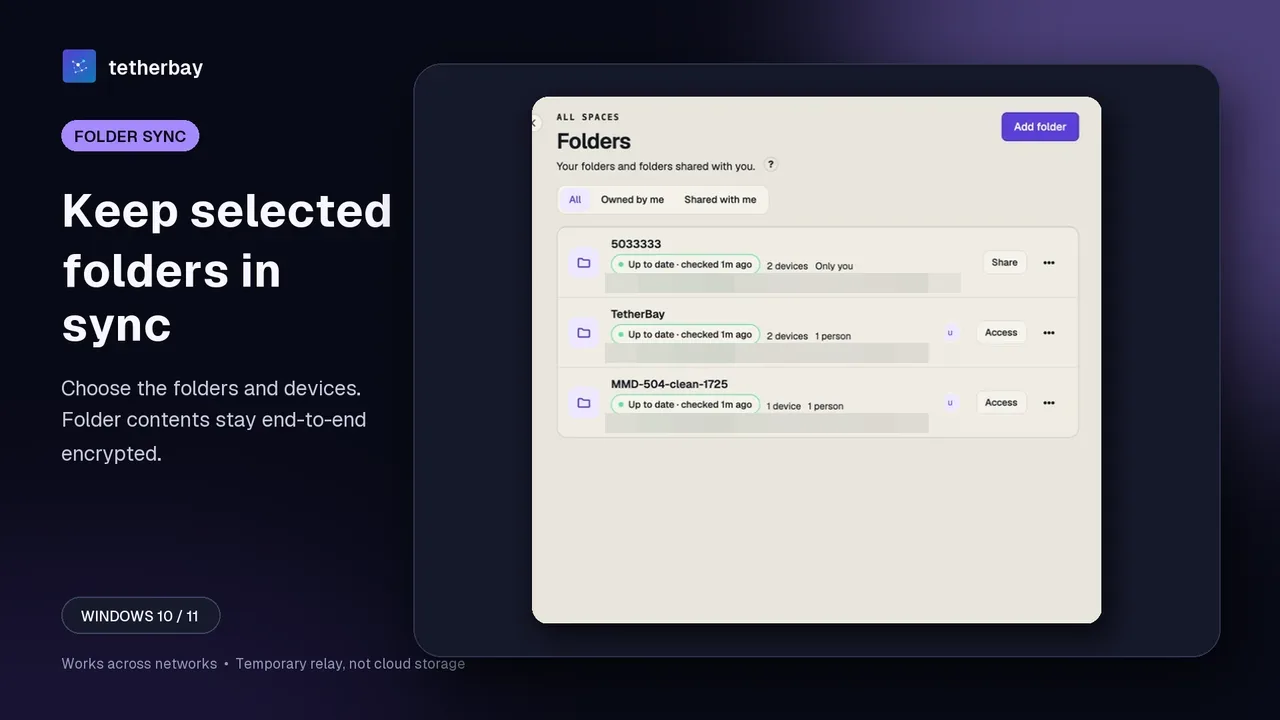
The part that differs most from a direct-sync tool is delivery. If your laptop is closed when you change a file on the desktop, the encrypted change waits on the relay and arrives when the laptop reconnects, within the retention period. The relay help page explains the buffer per plan, and How Foldpair works covers the network model.
When Foldpair is the better choice
The difference that matters is what happens on the day a direct connection does not form. Resilio's own brief describes its relay as what is used when peers cannot connect directly. Foldpair is built for that case as the normal one: the authenticated temporary relay is the designed path, so the workflow does not assume you will forward a port or get lucky with your NAT. It also works alongside an existing VPN.
Offline delivery is the second reason. Because the relay holds encrypted changes for devices that are away, a laptop that was shut for a day catches up when it opens, even if the desktop that made the change has since gone to sleep. Resilio's brief says relay pieces are not stored at rest, so that model relies on the other devices being online.
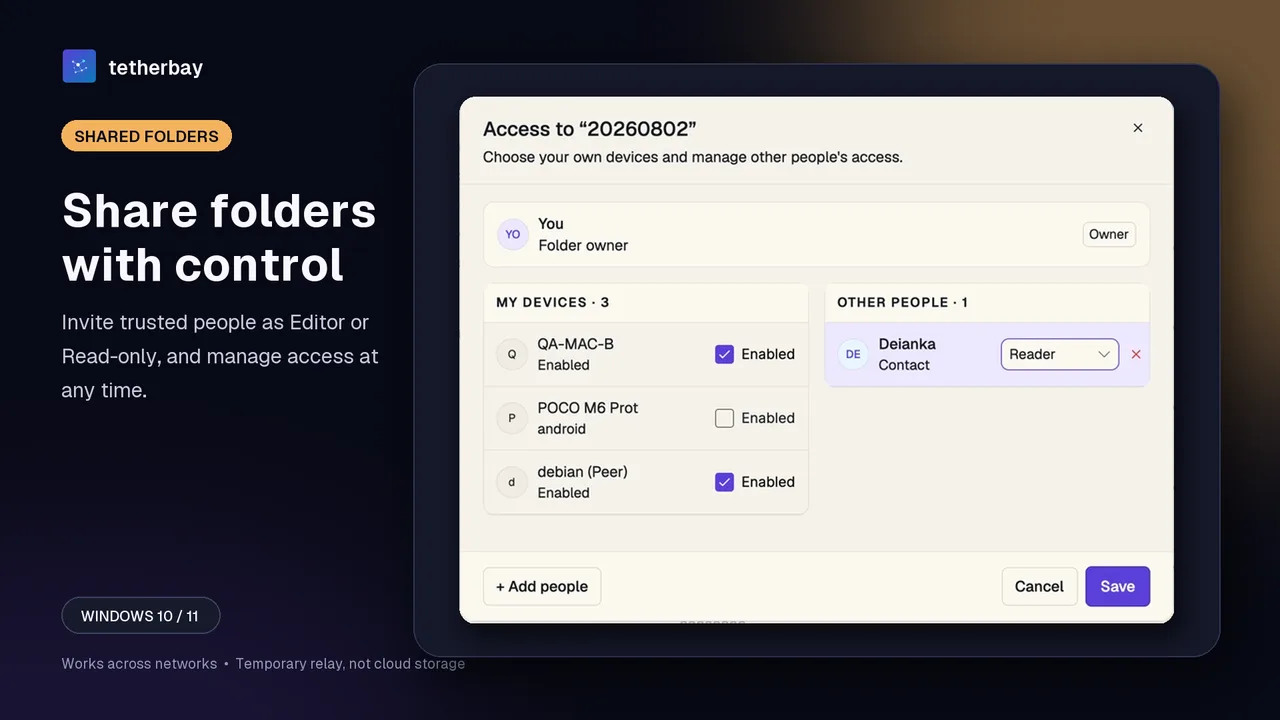
Sharing with other people is the third. Each member of a shared folder is an Owner, Editor or Reader, and the server rejects a Reader's uploads and edits. You manage this from one dialog, described on the member roles help page and the folder sharing page.
Clipboard is the fourth. Clipboard sync covers text and images between your own devices on every plan, each device has its own switch, and folder members never receive your clipboard. See clipboard sharing for details. Finally, the licence: Resilio states that its Sync download is for personal, non-commercial purposes only. Foldpair has a free plan ($0) and paid Pro and Team plans, so a work folder has a plan that fits it.
The trade-offs are real. Foldpair has no iOS release yet, no NAS packages, and its design depends on the Foldpair service. The relay sees file names and sizes, even though it cannot open file contents. If a relay in the path is a dealbreaker, a direct tool is the better fit, and our Syncthing comparison covers another open option.
Seeing what happened to a transfer
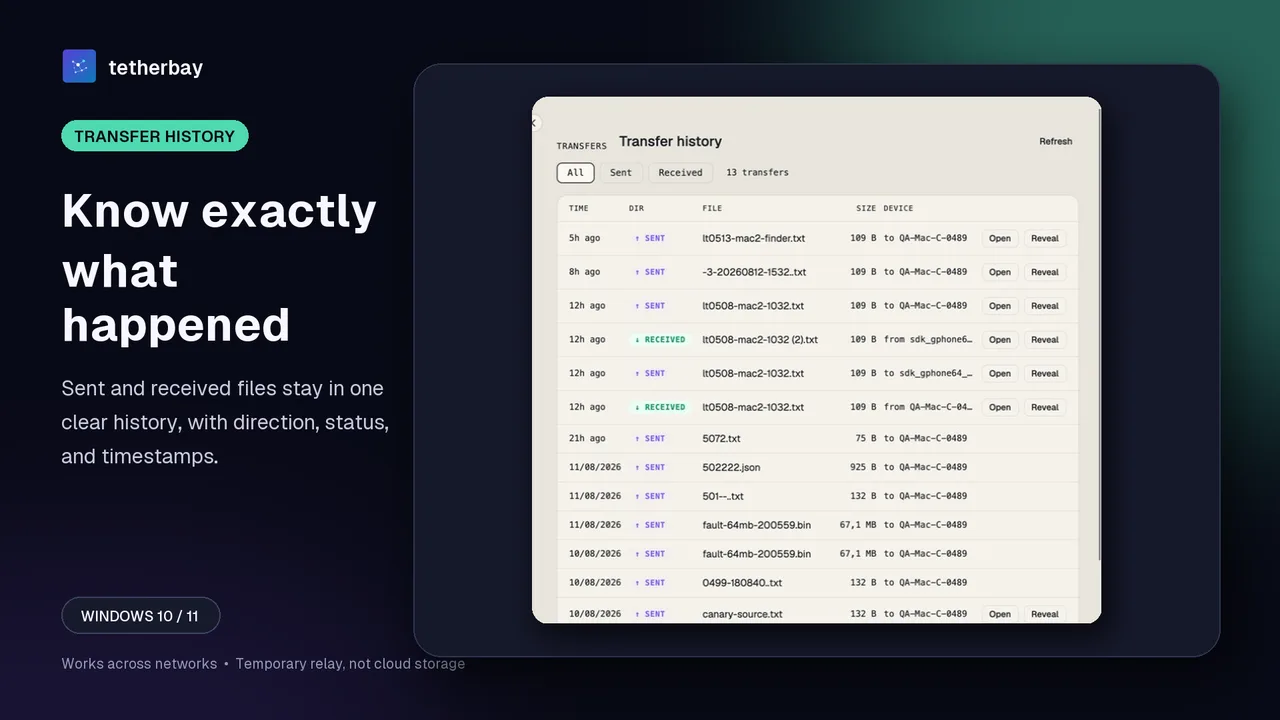
Foldpair's Transfer history lists one-off file sends and receives with direction, size, device and time. For one-off transfers, including from the Android app, that gives you a clear record of what arrived where.
Set it up in a few steps
- Download Foldpair and install it on the first computer, then sign in.
- Install it on the second device and sign in to the same account; no router or port settings are involved.
- On the first device choose Add folder and pick the folder you want to keep in sync.
- Enable that folder on the second device from the folder's Access dialog (see device pairing).
- Start with a small test file, confirm it appears on the other device, and keep a separate backup of any data you cannot replace.
Method and dates
Resilio facts were re-read on 15 November 2026 from the Sync product page and the Sync download page: product names (Sync Home, Resilio for Business), the licence sentence, platform list, and the fact that no prices are published. Pricing for business use is available only through Resilio's "Request Pricing" route, so this page quotes no figures. The Security & Privacy Brief carries a 2016 copyright line and was not re-opened today; it is quoted as Resilio's documented position on relay and encryption, not as a statement about the current build.
No first-party benchmark has been run. This page compares documented architecture, stated behaviour and published licence terms, not measured throughput, and it deliberately declares no overall winner: the two products optimise for different network conditions. Capabilities and prices change, so check the linked sources before deciding.
Frequently asked questions
Is Foldpair an alternative to Resilio Sync?
For syncing selected folders between your own devices, yes. The main difference is the connection model: Resilio connects devices directly and falls back to a relay, while Foldpair uses an authenticated temporary relay as its normal path and needs an account.
Can I use Resilio Sync for work?
Resilio's download page states that Sync is for personal, non-commercial purposes only, and points business users to Resilio for Business, with pricing on request. Foldpair has a free plan and paid Pro and Team plans.
Is the relay able to read my files?
No. File contents are encrypted on your device with AES-256-GCM before they reach the relay, and keys stay on your devices. The relay does see file names and sizes.
Which is faster on the same Wi-Fi?
A direct connection skips the relay, so Resilio is the natural choice for same-network copies. We have not run a speed test of either product, so we do not quote numbers.
Does Foldpair work on iPhone or a NAS?
Not yet. There is no iOS release, and no NAS packages. The Android app supports one-off file transfers rather than folder sync. Resilio lists iOS, Android and several NAS brands.
What if my other computer is switched off?
With Foldpair, the encrypted change waits on the relay and is delivered when that device returns, within the retention period. Try it first with a small test file.
Related guides and comparisons
Sources and related reading
- Resilio Sync — Security & Privacy Brief — first-party source for the direct-connection model, the symmetric-NAT relay fallback, the 97% direct-transfer figure, the 128-bit AES relay pieces and the tracker-server data list; carries a 2016 copyright line; checked October 5, 2026.
- Resilio Sync — download — states Sync is for personal, non-commercial purposes only; lists Windows, macOS, Linux x64/ARM64, mobile apps and NAS packages; points business users to a Request Pricing page with no prices; checked November 15, 2026.
- Resilio Sync — product page — names Sync Home and Resilio for Business; publishes no prices; free download includes features previously in Sync Pro; checked November 15, 2026.
- Resilio — Understanding the Sync Encrypted Folder — first-party description of the read-write, read-only and encrypted key types; checked October 5, 2026.
- How Foldpair works — first-party network and relay explanation; checked October 5, 2026.