Which job this solves, and which it does not
People searching for cross-computer clipboard sharing usually want to quit messaging themselves URLs and screen grabs. Directory synchronization is a clumsy substitute because clipboard state is transient rather than a saved file on disk.
Foldpair scopes clipboard sharing tightly on purpose. Only personal desktop machines running Windows, macOS, or Linux participate. Our page URL includes Android solely because searchers query all four operating systems together; read the dedicated Android section below for the exact mobile boundary.
- Works: text and images between your own Windows, macOS and Linux desktops, on any network.
- Does not: phones. Android handles files only, and no iOS app can be installed yet.
- Never shared: your clipboard stays out of reach of people you invite to a folder.
Get it running on two computers
- Download the desktop app from the download page onto both machines and sign in with one account.
- Alternatively, on a machine that is already signed in, pick Add another device and hand the newcomer a QR code, a link or the numeric code. The device pairing help shows each variant.
- Remember that a pairing link or code can admit a device to your entire account. Keep it private and remove unknown entries from the Devices tab.
- Open the clipboard settings of each computer and enable sharing there. Nothing is shared from a device until you do; see the clipboard sharing help.
- Copy a sentence on computer A and paste on computer B. Then take a screenshot and paste that too.
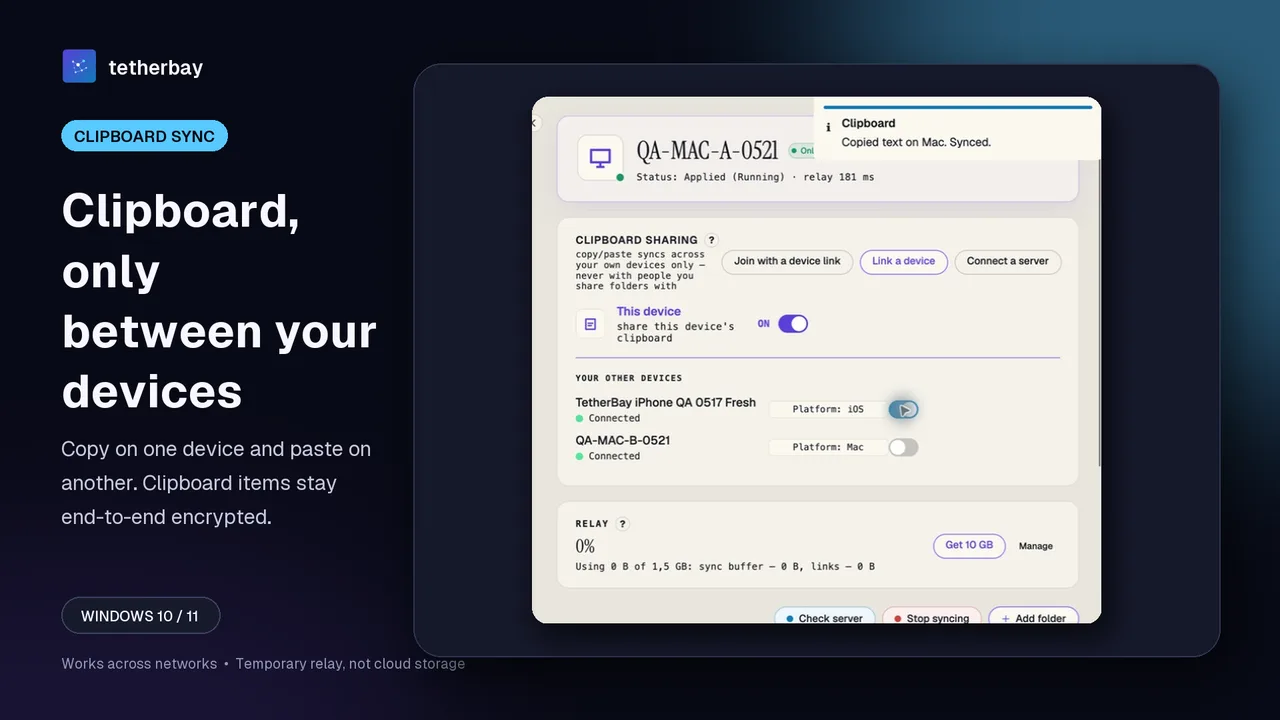
Test first with a disposable text snippet, and maintain separate backups for any irreplaceable work.
What happens when you copy
Clipboard sharing ships on every tier, including Free. Enabling the toggle on a desktop lets it both broadcast local copies and receive updates from your other machines; leaving the toggle off stops both directions. Leaving a family desktop or corporate laptop excluded takes one click.
Machines need not sit on one local Wi-Fi network: Foldpair is designed for separate networks and works alongside an active VPN. Desktop installers cover Windows, Apple Silicon and Intel Macs, plus x64 and arm64 Linux.
| Aspect | Behavior |
|---|---|
| Content | Text and images; use a synced folder for files |
| Slots | One current item per device, so a new copy replaces the previous one |
| Audience | Only your own devices, never folder members |
| Control | One switch per device |
| Price | Included on every plan, no card needed to download |
Seen by the relay, and not
Every copied text snippet or image is encrypted locally with AES-256-GCM on the sending desktop, while keys stay exclusively on your linked machines. Consequently, the relay forwards ciphertext that it cannot decrypt.
Certain routing metadata stays observable, however. On clipboard transfers the relay records the item type, the source device and the time; on file sync it also observes file names and sizes. Keep one operational detail in mind too: transport encryption will not prevent a copied password from landing on every desktop where clipboard sync is switched on, so keep the switch off on shared workstations. Further detail sits in the security write-up and the product overview.
What about Android?
On Android, Foldpair's app moves individual files via an inbox and outbox workflow. Neither clipboard synchronization nor directory mirroring belongs to the current Android scope. While you can push a PDF between handset and PC, text copied on Android never transfers to your desktop via Foldpair.
OS restrictions explain much of that gap. KDE's user guide points out that Android 10 blocks background processes from reading clipboard contents, offering a notification Send Clipboard action and, starting in Android 14, a quick-settings tile as workarounds. Whenever phone clipboard access tops your requirements, evaluate KDE Connect or ClipCascade, the two utilities in our table whose own docs describe Android support.
Handset file delivery is walked through in moving files between Windows and Android. As for iOS, no publicly installable build ships today, leaving zero iPhone functionality to claim.
How the alternatives compare
Competitor notes below reflect each project's published documentation checked on 2026-11-16; wherever a cell notes an omission, the cited source was silent.
| Option | Platforms (per its page) | What it carries | Conditions |
|---|---|---|---|
| Foldpair | Windows, macOS, Linux desktop apps | Text and images | One Foldpair account; any network |
| Windows clipboard history | Windows 10 and 11 | Up to 25 entries of 4 MB each, in text, HTML or bitmap form | Microsoft or work account for syncing between PCs |
| Apple Universal Clipboard | Mac, iPhone, iPad, Apple Vision Pro | Text, images, photos, videos | Same Apple Account, devices close together, Bluetooth, Wi-Fi and Handoff enabled |
| KDE Connect | Linux desktop, Android; iOS one-way and limited | Text only; the page says images do not work | Same network; firewalls must allow ports 1714-1764 |
| ClipCascade | Windows, macOS, Linux, Android | Text, images, files (README) | A server you host yourself or the community one |
Additional context: Microsoft's guide instructs users to press Windows+V, enable clipboard history, and activate cross-device syncing in Settings, noting that unpinned entries clear upon reboot. Apple's support article requires every device to share one Apple Account. KDE's documentation leaves Windows and macOS clipboard specifics unstated. ClipCascade's GitHub README, which we have not audited, lists end-to-end encryption among its core features.
Picking the right one
- Windows everywhere: use the built-in history, accepting the Microsoft account.
- Apple everywhere: use Universal Clipboard and keep the devices near each other.
- You need a phone clipboard: pick KDE Connect for text, or ClipCascade when hosting a server is fine.
- A mix of Windows, Mac and Linux desktops across networks: this is where Foldpair's clipboard fits.
Frequently asked questions
Is there clipboard sync on Android?
No. Foldpair's clipboard sync works between the desktop apps on Windows, macOS and Linux. The Android app supports one-off file inbox and outbox transfers only, so a phone's clipboard is not shared.
Can one clipboard cover my Windows, Mac and Linux machines?
Yes. Use one account on all of them and enable the clipboard on each. Text and images are available on every plan.
Is a copied item encrypted end to end?
Yes: it is sealed with AES-256-GCM before it leaves the computer you copied on, and the keys never leave your devices. The relay can tell what kind of item it was, which device sent it and when.
Must the computers share a network?
No. No; different networks are the design target, and an existing VPN is compatible. Universal Clipboard, by contrast, wants devices nearby.
What about iPhone and iPad?
There is no publicly installable iOS release yet, and the download page lists iOS as coming soon.
Can colleagues or invited people see what I copy?
No. Clipboard sync is confined to your own account; sharing a folder gives nobody your clipboard.
Related guides and comparisons
Sources and related reading
- Microsoft: clipboard in Windows — what the vendor says about history, cross-device sync, the account it requires, content formats and the per-item and entry limits; checked November 16, 2026.
- Apple: Universal Clipboard — which devices qualify and the account, proximity and Handoff conditions Apple lists; checked November 16, 2026.
- KDE UserBase: KDE Connect — the clipboard plugin, its text-only limit, the Android 10 restriction with workarounds, iOS behavior, same-network and port notes; checked November 16, 2026.
- ClipCascade on GitHub — project README read for platforms, self-hosted server and content types; its encryption statement was not tested by us; checked November 16, 2026.
- Clipboard sharing in Foldpair help — first-party page on the per-device switch, content types, own-devices-only scope and the metadata visible to the relay; checked November 18, 2026.
- Adding a device in Foldpair help — first-party steps for pairing by QR code, link or code; checked November 18, 2026.
- Foldpair security write-up — first-party threat model for keys, ciphertext and metadata; checked November 18, 2026.