At a glance
People often reach for Taildrop when they already run Tailscale and want to send a file from a laptop to a phone or workstation across networks. People evaluate Foldpair when they need selected folders to stay synchronized continuously, deliver changes when the other computer wakes up, or collaborate with another person. The table compares documented behavior from each product's primary documentation; where the Tailscale docs we cite are silent, the cell says so.
| Criterion | Foldpair | Tailscale Taildrop |
|---|---|---|
| Primary job | Continuous two-way selected-folder sync and clipboard sync between your own devices; on Android, one-off file inbox and outbox transfers. | One-off file transfers between your own personal devices on a Tailscale network (tailnet). |
| Documented product status | Desktop clients for Windows, macOS and Linux and a directly installable Android app; no publicly installable iOS release yet. | Documented as alpha; requires opting your tailnet in to the feature. |
| Sharing with other people | Supported via explicit invite links with Owner, Editor, and Reader roles enforced by the server. | Not supported: docs state Taildrop is limited to your own personal devices, and you cannot use it to send files to or from tagged nodes. |
| Receiving device is offline | Encrypted changes wait on the temporary relay and arrive when the device returns, within the relay retention period (depends on plan). | Docs state both devices must be running Tailscale; a failed transfer can usually be resumed for up to an hour (except when macOS or iOS is receiving). |
| Network path | Syncs through an authenticated temporary relay; designed to work across different networks. | Tailscale describes DERP relays as a last resort when hard NAT or firewalls prevent a direct connection; traffic stays WireGuard-encrypted. |
| Coexistence with another VPN | Compatible with an existing VPN. | Not covered by the docs we cite. |
| Encryption and metadata | Folder and clipboard contents encrypted on device with AES-256-GCM plus TLS; relay sees file names and sizes. | Tailscale states traffic sent over DERP is encrypted with WireGuard and that a DERP server cannot decrypt it. |
| Large changed files | FastRsync binary delta uploads when an earlier version of a changed file is known. | Folder-diff or delta transfer: Not covered by the Taildrop docs we cite. |
| Transfer / buffer limits | Relay buffers 1.5 GB in flight on Free and 10 GB on Pro; a single file larger than the free buffer space waits in the queue. | No file-size cap is documented on the Taildrop page we cite. |
| Clipboard sync | Text and images sync between your own devices with per-device switches. | Clipboard sync: Not covered by the Taildrop docs we cite. |
| Platforms | Windows, macOS (Apple Silicon and Intel), Linux (x64 and arm64); Android one-off file transfers; no public iOS release yet. | Documented for macOS, iOS, Windows, Android and Linux (CLI), with a separate NAS setup guide covering Synology and QNAP. |
| Pricing | Free plan ($0 forever) plus paid Pro and Team plans; no credit card to download. | Taildrop is available for all plans, including Personal ($0, free forever, up to 6 users and unlimited user devices). |
One-off file drop vs. relay-backed folder sync
The biggest practical gap between Taildrop and Foldpair is workflow model, not speed. Tailscale's Taildrop documentation describes sending files to another of your devices, with per-platform instructions for macOS, iOS, Windows, Android and Linux. On Linux you run tailscale file cp <files> <device>: and then sudo tailscale file get . on the receiving host. Received files land in ~/Downloads on macOS and in C:\Users\(username)\Downloads on Windows v1.34 or later.
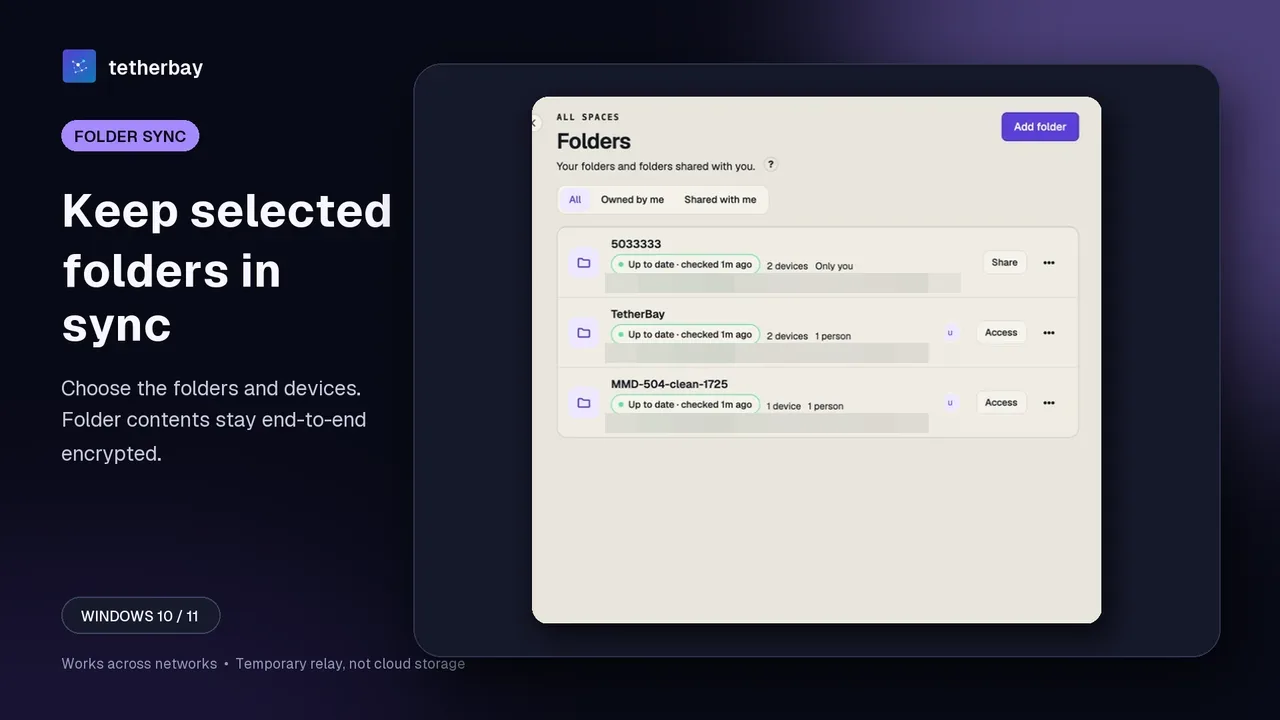
That design suits handing yourself a build artifact or photo once. The Taildrop docs we cite describe sending files, not watching a working directory, mirroring subfolders or propagating edits; if you edit a 400 MB dataset ten times a day, each update would be another send of the whole file, whereas Foldpair watches the selected folder and can upload a FastRsync binary delta on desktop when an earlier version is known.
Offline behavior separates the two just as sharply. Taildrop requires both devices to be running Tailscale, and Tailscale notes that a failed transfer can usually be resumed for up to an hour (except when a macOS or iOS device is receiving). In Foldpair, changes made while your second computer is asleep or traveling wait on the authenticated temporary relay in encrypted form and arrive once that machine reconnects, within a retention period that depends on your plan (see relay help).
Sharing with other people, NAS targets, and clipboard sync
Tailscale's documentation is explicit about who can receive a Taildrop transfer: "Taildrop is currently limited to sending files between your own personal devices." It also states that you cannot use Taildrop to send files to and from nodes you have tagged, which matters for shared team servers or CI hosts.
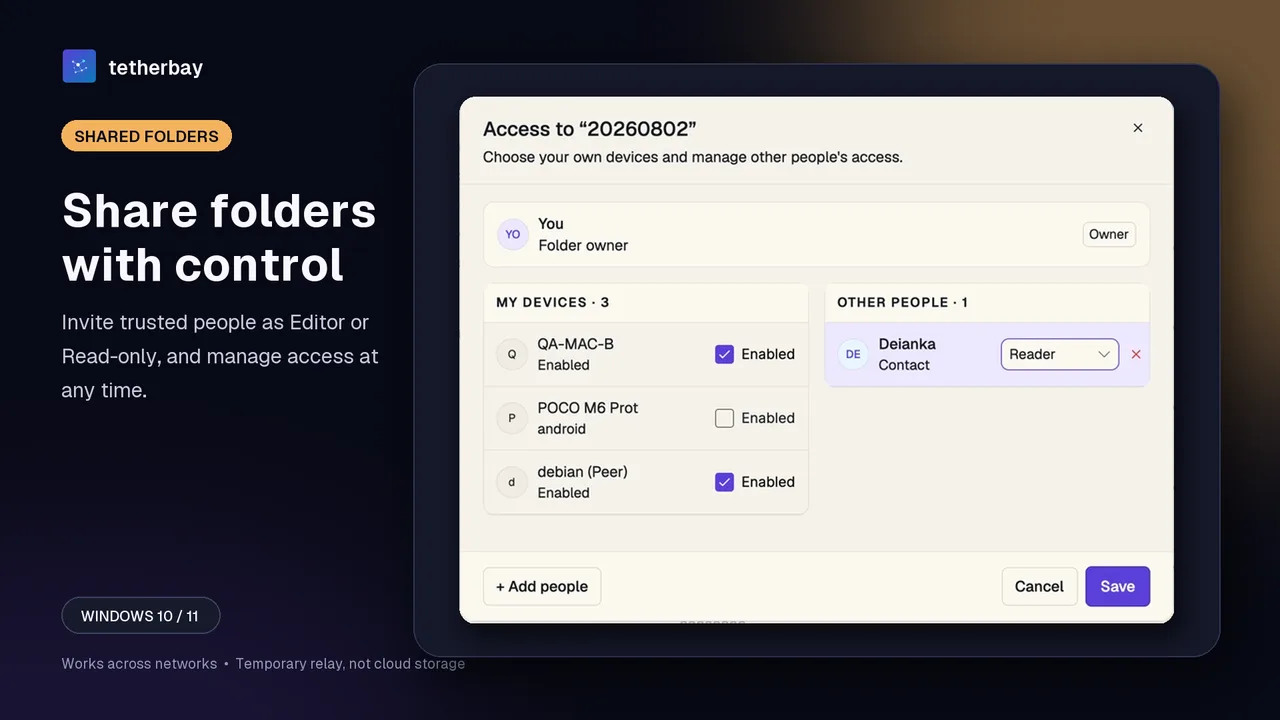
Foldpair is built for both personal multi-device sync and controlled collaboration. Inside a synced folder's Access settings, you can keep a folder private to your own selected devices or invite external clients and teammates with explicit Owner, Editor, or Reader permissions. The server rejects uploads and edits from Readers, and invited members accept access explicitly via a link. Read the member roles help page and our client and team sharing guide.
On the other hand, Taildrop covers surfaces that Foldpair does not: Tailscale documents receiving on iOS through the Files app, and has a NAS setup guide with sections for Synology and QNAP. Foldpair's Android app handles one-off file inbox and outbox transfers rather than full folder sync, and there is no publicly installable iOS release yet. Where Foldpair adds daily desktop convenience is clipboard sync for text and images between your own devices, with per-device switches; folder members never receive your clipboard.
Encryption, DERP relays, and running alongside another VPN
Taildrop transfers sent over DERP stay WireGuard-encrypted, and Tailscale states that a DERP server cannot decrypt them. Foldpair likewise keeps plaintext contents away from its relay operators: it encrypts folder contents and clipboard payloads on your device with AES-256-GCM before transport, protects transport with TLS, and keeps keys on participating devices; the Foldpair relay does see file names and sizes, as well as clipboard item type, source device, and time. See how Foldpair encryption works for full details.
Where their network assumptions diverge is VPN coexistence. Tailscale is a network layer you install on each device, and Taildrop needs both devices running it. Foldpair is designed to work across different networks and is compatible with an existing VPN. Whether Tailscale can run alongside another VPN on a given device is not covered by the docs we cite. We compare VPN scenarios in does file sync work with a VPN and the network limits in the CGNAT and firewall guide.
Set up Foldpair in a few steps
- Download Foldpair on your Windows, macOS, or Linux computers (or Android for one-off file transfers) and sign in.
- On a device already signed in, choose Add another device, then on the second computer scan the QR code, open the link, or paste the link or 6-digit code. See the device pairing help guide.
- Select Add folder on one desktop machine to mark a folder for continuous sync.
- Choose which of your devices receive the folder in its devices panel (Access), or invite a teammate as Editor or Reader.
- Verify the first transfer using a small test file and confirm it arrives intact on the destination disk while keeping a separate backup of irreplaceable data.
- Turn on the clipboard switch on each desktop device that should take part if you want copied text and images to follow you between your own computers.
When Tailscale Taildrop is the better choice
If Tailscale is already installed on all your devices and you only want quick, occasional one-off file sends between your own machines, adding a second app is unnecessary. Taildrop is the better fit when you move large archives between two running devices and want no relay buffer in the way (the Taildrop page we cite documents no file-size cap), when you script transfers on Linux with tailscale file cp, or when you send files straight to an iPhone or to a Synology or QNAP NAS.
When Foldpair is the better choice
Choose Foldpair when you need continuous two-way folder synchronization rather than manual file pushes, when laptops are frequently offline at different times, or when you edit large files and want FastRsync binary deltas instead of re-sending whole files. Foldpair is also the fit when you share folders with other people using Editor and Reader roles, need encrypted text-and-image clipboard sync between your own computers, or already use a VPN and want a sync tool that is compatible with it.
Method, sources, and FAQ
Tailscale and Taildrop details on this page were checked on November 16, 2026 against Tailscale's Taildrop documentation, its NAS setup guide, the DERP server reference, and the pricing page. No head-to-head throughput benchmark has been run between the two tools, so this comparison focuses on documented capabilities and sharing boundaries; where those docs are silent, we say so.
Can Taildrop sync a folder automatically like Foldpair?
No. Taildrop is documented as sending files between your own personal devices, with received files placed in a Downloads location or fetched via the CLI; the docs we cite do not describe continuous folder synchronization.
Can I use Taildrop to send a file to a coworker on my tailnet?
According to Tailscale's Taildrop documentation, no: Taildrop is limited to sending files between your own personal devices and cannot be used to and from tagged nodes. Foldpair supports sharing folders with other people via Owner, Editor, and Reader roles.
Does Foldpair work with my corporate VPN?
Foldpair is designed to work across different networks and is compatible with an existing VPN. Whether Tailscale can run alongside another VPN is not covered by the docs we cite.
What happens if the receiving computer is asleep?
Taildrop requires both devices to be running Tailscale to transfer files. Foldpair holds encrypted changes on its temporary relay, up to your plan's buffer (1.5 GB Free, 10 GB Pro) and within a retention period that depends on your plan, until the other device comes back online.
Does Taildrop work on iOS and NAS devices?
Yes. Tailscale documents Taildrop for iOS and has a NAS setup guide with Synology and QNAP sections. Foldpair has no publicly installable iOS release yet, and its Android app handles one-off file transfers rather than folder sync.
Are either Taildrop or Foldpair free to try?
Yes. Tailscale's Personal plan is $0 free (Taildrop is available on all plans once opted in), and Foldpair offers a $0 forever-free plan with no credit card required to download.
Related guides and comparisons
Sources and related reading
- Taildrop — Tailscale Docs — Taildrop docs: alpha status and tailnet opt-in, limited to your own personal devices, no tagged nodes, resume for up to an hour (except macOS/iOS receiving), both devices running Tailscale, platform sections, Downloads locations, available for all plans, no file-size limit stated; checked November 16, 2026.
- Taildrop with NAS devices — Tailscale Docs — separate setup steps for Synology and QNAP devices to receive Taildrop files; checked November 16, 2026.
- DERP servers — Tailscale Docs — DERP as a last-resort relay when hard NAT or firewalls prevent direct connections; WireGuard-encrypted traffic a DERP server cannot decrypt; checked November 16, 2026.
- Tailscale Pricing — Personal plan: $0, free forever, up to 6 users, unlimited user devices; checked November 16, 2026.
- Does file sync work with a VPN? — first-party analysis of VPN coexistence, split vs full tunnels, and mobile single-VPN limits; checked November 16, 2026.
- Owner, Editor, and Reader — folder roles explained — first-party capability table for shared folder roles; checked November 16, 2026.