Which job are you actually doing
Readers compare Tailscale Taildrop with Foldpair because both move files across separate networks without a hosted drive. Match your actual workflow to the left-hand column below. Every Taildrop detail comes from official Tailscale documentation checked on 16 November 2026, with silent points explicitly noted.
| The job | Better fit | Reason |
|---|---|---|
| Send a build or a photo from laptop to phone, once | Taildrop | It is made for sending a file between your own devices, and it includes iOS, plus Synology and QNAP NAS guides. No second app if Tailscale is already installed. |
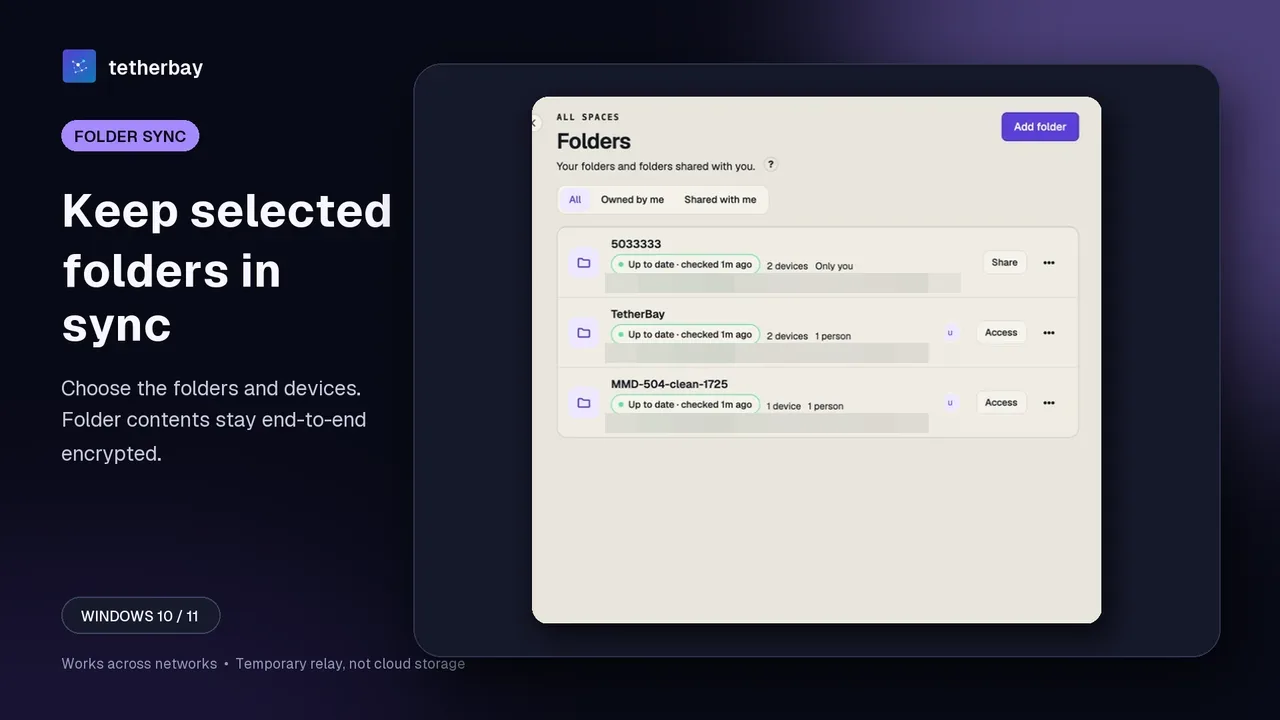
| Keep a project folder identical on two computers | Foldpair | Foldpair watches selected folders and syncs changes in both directions. Taildrop's cited docs cover sending files, not watching a directory. |
| Edit a large file many times a day | Foldpair | In folders without end-to-end encryption the desktop app can upload a FastRsync delta instead of the full file; encrypted folders re-upload the changed file in full. Taildrop's docs we cite do not cover deltas. |
| The target computer is often asleep or travelling | Foldpair | Encrypted changes queue on the relay and arrive on reconnect, within your plan's retention period. Taildrop needs both devices running Tailscale, with resume for up to an hour after a failure, except when macOS or iOS is receiving. |
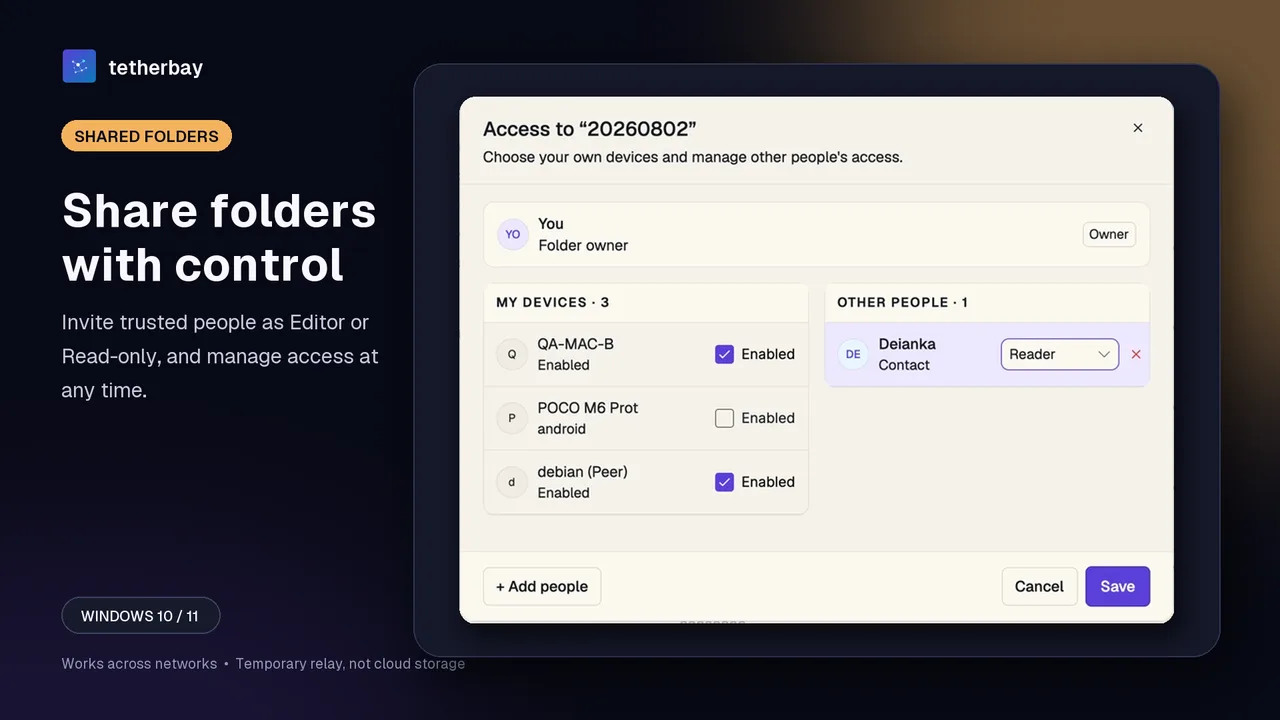
| Give a client read-only access to one folder | Foldpair | Foldpair offers Owner, Editor and Reader roles. Taildrop's docs restrict it to your personal devices and exclude tagged nodes. |
| You already run another VPN | Foldpair | Foldpair is designed to work across different networks and alongside an existing VPN. Whether Tailscale can run next to another VPN is not covered by the docs we cite. |
| Script a transfer on Linux | Taildrop | tailscale file cp <files> <device>: sends, and sudo tailscale file get . receives on the other host. |
Omitted from the table because Tailscale's cited documentation stays silent: clipboard sharing, binary delta transfers, and file-size caps (no size limit is documented on the Taildrop page we cite).
Why a file drop cannot replace a synced folder
Consider a 400 MB dataset modified ten times daily. Under Taildrop, every revision requires manually pushing the entire file again while the target endpoint is live on Tailscale, dropping copies into Downloads (~/Downloads on macOS, C:\Users\(username)\Downloads on Windows 1.34+) or staging them for CLI retrieval. By contrast, Foldpair's desktop client monitors the directory automatically and, on folders without end-to-end encryption, uploads strictly the FastRsync delta.
Sleeping hardware creates the second divergence. When a receiving machine goes offline mid-send, Tailscale notes that interrupted Taildrop transfers generally resume within up to one hour, unless macOS or iOS is receiving. With Foldpair, modified folder bytes wait at the authenticated temporary relay, encrypted whenever folder encryption is enabled, and download once the offline machine reconnects within your plan's retention window; consult relay help.
Other people, phones and NAS boxes
According to Tailscale's guide, Taildrop operates strictly among personal devices owned by one user and excludes tagged nodes, ruling out shared team hosts and tagged CI runners.
In Foldpair, a synchronized directory can remain private across your personal machines or include invited clients and teammates under Owner, Editor, or Reader permissions; Readers can download files while the server rejects any upload or edit. Read member roles alongside our client and team sharing guide.
Platform breadth favors Taildrop today: Tailscale documents iOS support as well as dedicated NAS setup guides for Synology and QNAP. Foldpair focuses on Windows, macOS, and Linux desktops, while its Android client handles individual file transfers only and no public iOS build ships yet. On desktop, Foldpair adds per-device clipboard sharing for text and images across your own account, isolated from folder collaborators.
Network path, encryption and VPNs
Tailscale's reference docs position DERP servers as a last-resort relay whenever symmetric NAT or strict firewalls prevent direct links, noting that DERP forwards WireGuard-encrypted packets it cannot decrypt. Foldpair seals end-to-end directory contents and clipboard items locally using AES-256-GCM, wraps connections in TLS, and keeps keys on participating endpoints. File names and sizes remain visible to Foldpair's relay, alongside item type, source device, and timestamp for clipboard entries; see how Foldpair encryption works.
Regarding VPN coexistence: Tailscale installs a network layer on every participating host, and Taildrop requires active Tailscale clients at both ends. Foldpair is designed to work across different networks and runs alongside an existing VPN. Explore practical setups in does file sync work with a VPN and our CGNAT and firewall guide.
Cost
After tailnet activation, Taildrop ships across every Tailscale tier, including the $0 Personal plan (covering up to 6 users and unlimited personal devices per Tailscale's pricing page). Foldpair likewise offers a $0 Free tier alongside paid Pro and Team plans, with no payment card required to download.
Start syncing a folder in six steps
- Download Foldpair for your Windows, macOS or Linux computers and sign in (Android is for one-off file transfers).
- Add the second computer from a signed-in device with the QR code, link or 6-digit code (device pairing).
- On one desktop choose Add folder for the directory you want kept in step.
- In the folder's Access panel pick the devices that receive it, or invite a person as Editor or Reader.
- Check the first transfer with a small test file and keep a separate backup of irreplaceable data.
- If you want the clipboard, enable it on each desktop that should join.
Verdict: when each one wins
Pick Taildrop whenever Tailscale already runs across your fleet and you need occasional manual drops, CLI-scripted Linux pushes, iPhone delivery, or transfers onto a Synology or QNAP NAS. Pick Foldpair when you need continuous two-way directory sync, offline queuing across staggered schedules, FastRsync deltas on large plaintext folders, role-based external sharing, or compatibility alongside an existing VPN.
Sources and FAQ
All Tailscale facts were verified on 16 November 2026 against official Taildrop docs, the NAS setup guide, DERP server reference pages, and Tailscale pricing. No throughput benchmarks were run.
Can Taildrop sync a folder like Foldpair?
No. Taildrop is documented as a way to send files among your own personal devices; they arrive in Downloads or via the CLI, and continuous folder sync is not described.
Can I Taildrop a file to a colleague?
Not per Tailscale: it limits Taildrop to your own personal devices and excludes tagged nodes. Foldpair shares folders with others under Owner, Editor and Reader roles.
Does Foldpair work with my corporate VPN?
Foldpair is designed to work across different networks and alongside an existing VPN. Whether Tailscale can coexist with another VPN is not covered by the docs we cite.
What if the receiving computer is asleep?
Taildrop needs both devices running Tailscale. Foldpair queues encrypted changes on its relay (1.5 GiB on Free, 10 GiB on Pro) until the other device is back, within the plan's retention period.
Does Taildrop cover iOS and NAS?
Yes: Tailscale documents iOS and a NAS guide with Synology and QNAP sections. Foldpair has no public iOS release and its Android app handles one-off transfers, not folder sync.
Are both free to try?
Yes. Tailscale's Personal plan is $0 and includes Taildrop once enabled. Foldpair's free plan is $0 forever and needs no credit card to download.
Related guides and comparisons
Sources and related reading
- Tailscale Docs: Taildrop — Source for the alpha label, opt-in, personal-devices rule, resume window, platform notes and the absence of a stated size limit.; checked November 16, 2026.
- Tailscale Docs: Taildrop with NAS — Source for the NAS claims.; checked November 16, 2026.
- Tailscale Docs: DERP servers — Where DERP relays are used and what they can and cannot read.; checked November 16, 2026.
- Tailscale pricing — Personal tier price and its user and device allowances.; checked November 16, 2026.
- Does file sync work with a VPN? — Our own walk-through of VPNs and sync.; checked November 16, 2026.
- Foldpair help: member roles — What each folder role may do.; checked November 16, 2026.