Which one fits your situation
Begin with your real-world network layout rather than an abstract checklist. Each row below pairs an everyday topology with whichever architecture handles it more naturally. Descriptions of Syncthing come straight from official Syncthing docs, while Foldpair specifics reflect our verified product specification.
| Your situation | Better starting point | Why |
|---|---|---|
| Two machines on one home or office network | Syncthing | Peers that can see one another link straight up, no vendor service sits in between, and the software is free. |
| A laptop that travels and a desktop at home, on unrelated networks | Foldpair | Foldpair is designed to work across different networks and alongside an existing VPN; Syncthing suggests opening 22000/TCP and 22000/UDP, or else accepting slower public relays. |
| You must avoid accounts and run only software you can audit | Syncthing | No accounts, a Device ID trust model and published source. Foldpair needs an account and depends on its service. |
| The other computer is often switched off or asleep | Foldpair | Changes wait on the relay in encrypted form and arrive when the device returns, within your plan's retention period. |
| You also want copied text and screenshots to follow you between desktops | Foldpair | Clipboard sync covers text and images between your own devices; Syncthing's cited folder-sync docs do not cover a clipboard. |
| A client or teammate gets access to one folder, read-only | Foldpair | Each member is an Owner, Editor or Reader and uploads from a Reader are refused by the server; Syncthing's cited docs describe sharing by exchanging Device IDs, not per-person roles. |
| A phone must keep folders in sync continuously | Check Syncthing's platform list | Foldpair's Android app handles one-off file transfers only, and there is no public iOS release. |
What setup really involves on each side
Day-one onboarding shows the sharpest contrast between these two tools. Compare the steps side by side.
Syncthing: put the client on each endpoint, exchange cryptographic Device IDs across peers, approve mutual connection requests, and assign shared directories. On a flat local network, pairing finishes fast. Across NAT boundaries, Syncthing's firewall docs recommend UPnP or forwarding ports 22000/TCP and 22000/UDP manually, noting that fallback routing over community relays runs significantly slower.
Foldpair: follow the steps listed below. You skip manual Device ID exchanges and router admin panels because each endpoint dials out to the relay instead of connecting directly peer to peer.
- Download Foldpair and sign in on the first computer.
- On the second computer, sign in with the same account; the device pairing help covers link, QR code and code options. Treat a pairing link like a password.
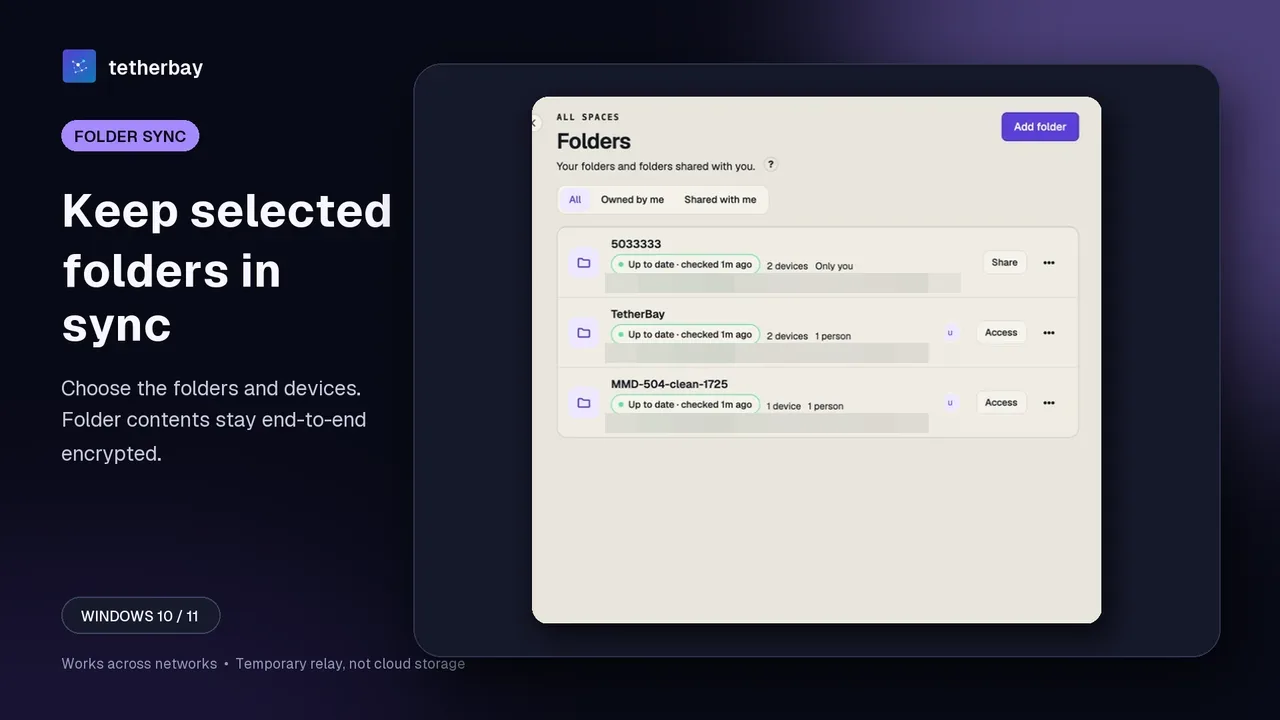
- Choose Add folder on the first device and pick the folder to keep in sync.
- Switch the folder on for the second device in its Access dialog.
- Drop in a small test file, confirm it arrives, and keep a separate backup of anything irreplaceable.
- Turn on clipboard sharing on the devices that should take part, if you want it.
Where the other computer is off
Syncthing's cited documentation describes neither a central staging queue nor offline buffering for powered-down peers, so we make no assumptions beyond what it publishes. Its encrypted untrusted-peer feature, marked beta or testing in upstream docs, solves a separate problem: storing opaque replicas on an always-on host you control without trusting.
Asynchronous delivery sits at the center of Foldpair's design. Save edits while your second machine is powered down and those updates wait at the relay, sealed as ciphertext on encrypted folders, until the offline peer comes back or your plan's retention window expires. In-flight buffered volume maxes out at 1.5 GiB on Free or 10 GiB on Pro, while any single file exceeding remaining buffer space queues locally; full caps appear on the relay help page.
Privacy: who sees what
Syncthing ties identity directly to each endpoint's TLS certificate fingerprint: connections succeed only when the remote certificate matches an approved Device ID, with mutual TLS protecting bytes in flight. That peer-to-peer trust boundary stays compact and straightforward to inspect. Leaving global discovery turned on broadcasts your Device ID to public lookup servers on a 30-minute schedule, though users can disable global announcements.
With Foldpair, cryptography happens locally before upload. Clipboard entries alongside files inside end-to-end encrypted folders (switched on automatically by desktop clients for owned folders once all participating endpoints support it) are encrypted using AES-256-GCM prior to leaving disk, wrapped inside transport TLS while keys remain on your computers. Two boundaries matter: directories where encryption was never turned on transmit plaintext, and even encrypted directories reveal file names and byte sizes to the relay (or item type, origin endpoint, and timestamp for clipboard sync). Read the encryption page and security overview for full details.
Peer-to-peer sockets avoid third-party transit servers and can saturate local link capacity, whereas relay routing introduces an extra network hop plus reliance on hosted infrastructure. Because we ran no comparative speed benchmarks, neither tool is declared faster here.
Clipboard, people and phones
On desktop systems, Foldpair also synchronizes copied text and images across your personal computers. Every endpoint provides an independent toggle across all plan tiers, and external collaborators on shared folders never receive your clipboard data. Configuration steps live under clipboard sharing.
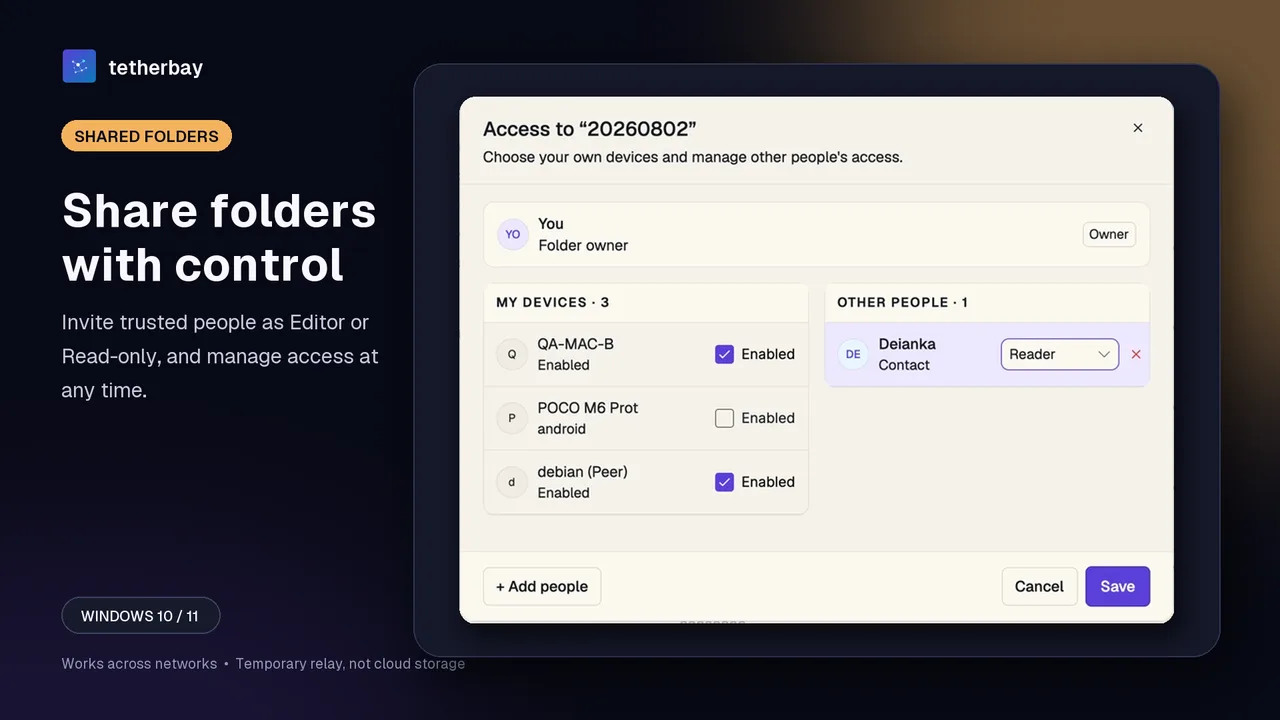
Multi-user folder access follows explicit Owner, Editor, and Reader permissions detailed in the member roles help. Mobile folder sync remains Foldpair's main gap: Android handles one-off file transfers without folder mirroring, while iOS has no public build yet. Whenever continuous folder sync on a handset is mandatory, check Syncthing's current mobile ecosystem before deciding.
Where Syncthing wins
Pick Syncthing whenever your endpoints enjoy direct LAN reachability, configuring UPnP or router port rules feels routine, or source-code auditability with zero vendor dependency tops your priorities. Syncthing is battle-tested, open source, and free. By comparison, Foldpair requires account sign-in and depends on Foldpair relay availability.
Sources, dates and questions
Every statement regarding Syncthing comes from upstream documentation (security, relaying, and firewall guides checked 5 October 2026; untrusted-devices docs checked 15 November 2026; release v2.1.2 dated 8 July 2026). Because we conducted no throughput benchmarks, treat this article strictly as an architectural comparison. For ad-hoc file drops over shared Wi-Fi, read Foldpair vs LocalSend.
Is Foldpair a good Syncthing alternative?
For keeping chosen folders identical across your own computers, yes. They part ways on connectivity: Syncthing pairs peers by ID and goes direct when possible, public relays otherwise; Foldpair always goes through its authenticated temporary relay and asks you to sign in.
Do I need port forwarding with Foldpair?
The app's setup flow never asks for router changes, and Foldpair is designed to work across different networks and alongside an existing VPN. Syncthing's own firewall page, for comparison, suggests UPnP or opening 22000/TCP and 22000/UDP so peers can connect directly.
Can Foldpair read my files?
For folders with end-to-end encryption on, no: contents are locked on your device with AES-256-GCM before upload and the relay cannot open them. It can still read file names and sizes, plus type, source device and time for clipboard items. A folder where encryption was never enabled syncs as plaintext.
What when the other computer is powered down?
The change sits on the relay, encrypted when the folder has encryption on, and is handed over once the device reconnects, as long as your plan's retention window has not run out. The in-flight allowance is 1.5 GiB on Free and 10 GiB on Pro.
Can I run both on one machine?
The cited documentation does not rule it out. Just keep each tool on its own folder, never the same one, and try a small test file first.
Is Foldpair free?
Yes, the free plan costs $0 with no card needed to download; Pro and Team are paid. Syncthing costs nothing and is open source.
Related guides and comparisons
Sources and related reading
- Syncthing: Security Principles — TLS between devices, admission by certificate fingerprint (Device ID), and the 30-minute global discovery announcement.; checked October 5, 2026.
- Syncthing: Relaying — Relaying is on by default, used only without a direct path, and much slower than a direct connection.; checked October 5, 2026.
- Syncthing: Firewall Setup — Port 22000/TCP and 22000/UDP forwarding advice and the cost of relaying without it.; checked October 5, 2026.
- Syncthing: Untrusted (Encrypted) Devices — Encrypted peers, their beta or testing status, and which metadata stays visible.; checked November 15, 2026.
- Syncthing v2.1.2 release — Release the documentation statements were checked against.; checked October 5, 2026.
- How Foldpair works — First-party explanation of the account, relay and network model.; checked October 5, 2026.